Extend a job posting's ad end date
Permission level required: ✅ System Administrators, Entity Managers, Job Owners, Full Access, or View Access.
Written By RecruiterPal Helpdesk
Last updated 3 months ago
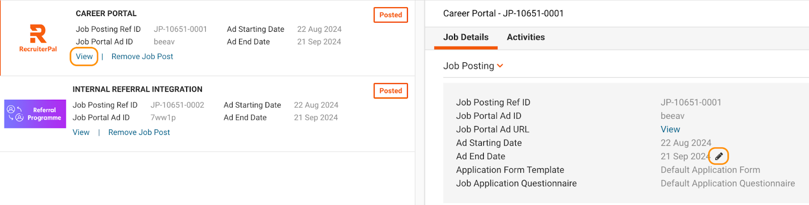
Users with the required permissions can extend the advertisement end date of a job published on the Career Portal. Follow the steps below to update the job's Ad End Date.
Click Hire > Job Opportunities > View Job Postings for the relevant job > View. Click the pencil icon next to the Ad End Date field > select the new end date, then click Save.
Note: This feature applies only to jobs published on the internal Career Portal. Jobs posted to external job portals cannot be extended using this method.
Was this helpful?